
Feature
Build your own mobile app
An app does not die of being badly born. It dies of version 4. The first one ships, it works, everyone is happy — then iOS changes, a bug comes back, an idea arrives, and you have to reopen a budget nobody had planned. Here, publishing on the App Store and Google Play is the first day: you describe the app, you try it on a phone, it goes out on both stores, and a team of agents then moves it forward version after version, without a new quote.
1. Why an app costs so much
An app is not a website with a different screen. It is two systems that do not resemble each other, two sets of rules, two stores with their own procedures, and developer accounts to maintain. That is why quotes start high, and why so many projects stop before they begin.
But the visible cost is not the one that kills. It is the updates. A published app is not finished: the operating system changes every year, stores change their requirements, the first users report what nobody had seen. Each of those steps reopens the quote — and the day the budget no longer follows, the app stays on the stores in its original version, until it is pulled.
Many companies therefore have no app, not because they see no point in one, but because they have understood that the first invoice was only the first. The right question is not “what does an app cost”: it is who looks after it next year.
2. What changes: a team stays after publication
Tools that produce an app from a description appear regularly. What they all lack is what comes next: they deliver a project, and the project is then an orphan.
Here, the agents that built the app stay in place. One takes the feedback received and fixes it, another prepares the next version when a store changes its requirements, another announces what is new, another feeds sign-ups into the customer file. The app stops being a deliverable and becomes a product that is kept.
It is the same logic as for the website, and for the same reason: what costs money in software is not building it, it is keeping it alive. A company with no technical staff does not need a provider for version 1 — it needs someone for versions 2, 3 and 4.
3. How the build works
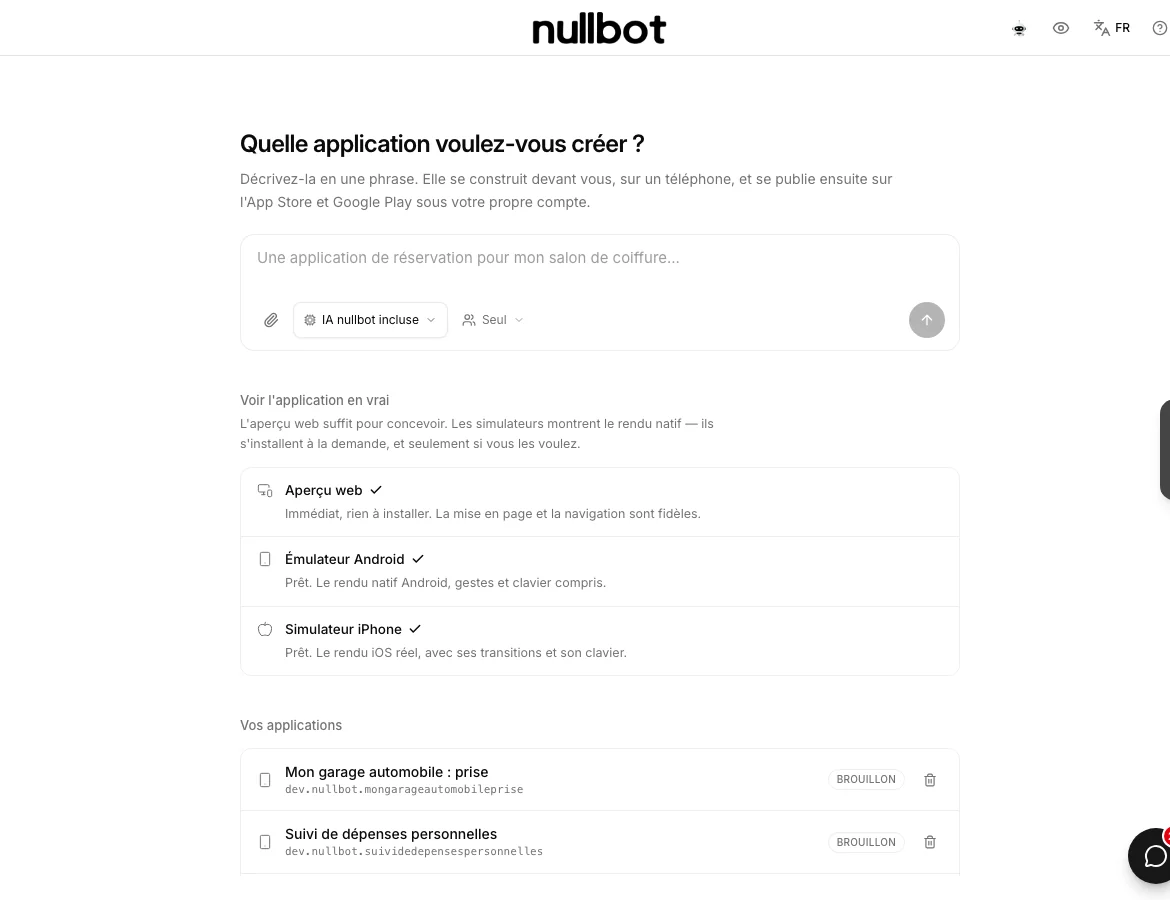
You describe the app in one sentence: what it should make possible, who it is for, what the person does on opening it. “A booking app for my hair salon”, for instance, is enough to start.
The agent opens several directions rather than a single take-it-or-leave-it proposal, which you look at before choosing. After that everything is corrected by saying so: add a screen, change a flow, rework a label. Each change produces a version, and you go back if the result displeases.
The app has its own database for what it collects — bookings, sign-ups, records — and that data stays viewable and exportable from the studio. An app you cannot get your own customers' data out of is not really yours.
4. Trying it before publishing
This is where most tools stop, and it is what counts: an app is not judged on a mock-up but under your thumb. Three ways to try it, from the most immediate to the most faithful.
- The web preview. Immediate, nothing to install. Layout and navigation are faithful: this is what you use while designing.
- The Android emulator. Native Android rendering, gestures and keyboard included.
- The iPhone simulator. Real iOS rendering, with its transitions and its keyboard.
The last two install on demand, and only if you want them: they are heavy, and the web preview is enough for most of the work. You switch them on when it is time to check that what you described really looks like an app, and not like a website in a phone frame.
5. Publishing on both stores
The app goes out on the App Store and Google Play under your own developer account. That is a detail that is not one: the app belongs to you, it carries your publisher name, and you are not renting the listing.
Before sending, a pre-flight check runs over the app to catch what stores usually refuse — that is what avoids review round-trips, which cost a week each. The state of publication is followed from the studio, store by store.
Two things remain yours to do, and no tool can do them for you: opening the developer accounts (Apple and Google bill for them, one yearly, the other once) and signing the undertakings the stores require of the publisher. We do not create accounts and do not enter passwords on your behalf.
6. The limits, stated plainly
Better to know them before opening a developer account.
- Store review is never guaranteed. Apple and Google refuse whom they like, for reasons of their own. The pre-flight check reduces the common refusals; it does not promise approval.
- A vague app gives a vague app. As with a site: if you cannot say what the user does on opening the app, no tool will guess it.
- Phone hardware has its limits. An app that relies on unusual sensors, heavy video processing or specific hardware falls outside this scope.
- Publishing commits you. An app collects personal data; that implies a privacy policy and obligations that fall to you, which the store will ask for.
7. Frequently asked questions
Do I need to know how to code to create an app?
No. The app is described in plain language and corrected by saying so. What is required is not a technical skill but clarity: being able to say what the person does on opening the app, and in what order.
Is the app published under my name?
Yes, under your own Apple and Google developer account. Your publisher name appears on the listings, and you keep control of the app. That is the point to check with any provider: an app published under someone else's account is an app you do not own.
What do developer accounts cost?
They are billed by Apple and Google, not by us: Apple on an annual basis, Google once when you open the account. The amounts change by country and over time — check them directly with them rather than trusting a figure read elsewhere, here included.
And updates?
That is precisely the point. A published app needs successive versions: fixes, operating-system changes, new store requirements. Your agents prepare them, by being asked, without reopening a quote each time. It is that work, not version 1, that decides whether the app is still usable in two years.
Can I have an app and a website with the same content?
Yes. A mobile version of a site is generated from the site studio project, which is often enough. A true installable app, present on the stores and able to behave like a native app, belongs to this studio. The two coexist, and you choose by use rather than on principle.
Going further
Read next: build your own website, what a post really costs, or what an autonomous AI agent is.